
Dashlytics Controller Gadget
The Dashlytics Controller Gadget is an optional Jira dashboard gadget that provides a shared JQL data source for one or more Dashlytics Statistical Report Gadgets on the same dashboard.
When Statistical Report Gadgets are connected to a Controller, updating the Controller's JQL automatically refreshes all connected gadgets — so you can change the scope of an entire dashboard in one place instead of editing each gadget individually.
You can add multiple Controller Gadgets to the same dashboard, allowing different groups of Statistical Report Gadgets to use different data sources.
Configuring the gadget
Put the dashboard into edit mode with Edit, then choose Configure from the gadget's ⋯ menu. The Controller has one setting.
Name
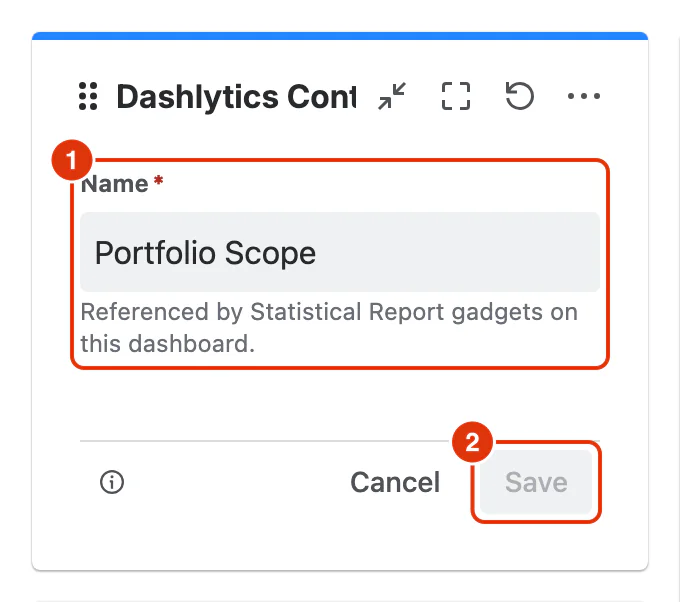
Name (required) (1) — a descriptive name for this Controller, such as Mobile Team — Active Sprint or Q2 Bug Backlog. It is what Statistical Report Gadgets on this dashboard refer to when they pick a Controller, so make it easy to identify — especially when the dashboard has more than one.
Click Save (2) to apply the name, or Cancel to leave it unchanged. Leave dashboard edit mode with Done.
View mode
View mode is where you set and update the Controller's JQL query. Changes here immediately affect all connected Statistical Report Gadgets.
JQL
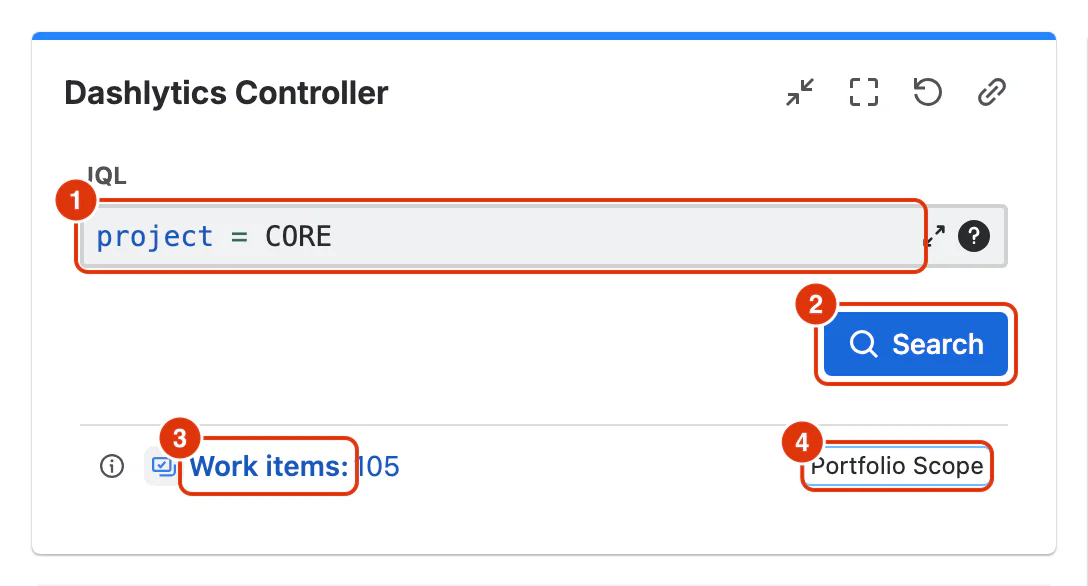
JQL (1) — the query that defines the set of work items this Controller represents. Click Search (2) to apply it.
Work items
Once the query is applied, the gadget displays the total number of matching work items (3). This is a quick confirmation that the JQL returns the expected scope before connected reports update.
Controller name
The bottom-right of the gadget shows the Controller's name (4) — the same name the connected Statistical Report Gadgets display, so it is clear which data source they follow.
For a step-by-step guide to connecting gadgets to a Controller, see Using Dashboards in the Feature Guides section.