
Managing Reports
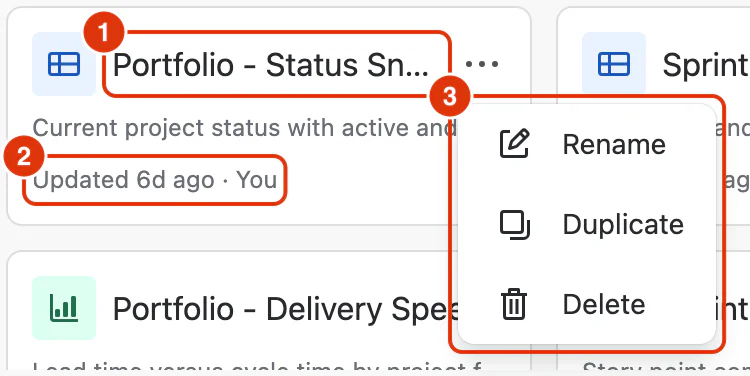
Dashlytics lets you save, organise, and manage reports from the Home screen. To open it, go to Apps → Dashlytics in the Jira left sidebar, then click Home in the Dashlytics navigation. All saved reports appear here sorted by most recently updated, with a search bar to find reports quickly.
Saving Reports
Reports are saved from within the Report Builder:
- Save → updates the currently open report with your latest changes. The report name and configuration are overwritten.
- Save as → saves the current configuration as a new report. Enter a unique name (60 characters max) and an optional description of what the report shows and who it is for.
New reports start with the title "Untitled report" until saved.
Renaming Reports
To rename a report, click the pencil icon next to the report name at the top of the Report Builder. This opens a Report Details popup where you can update the name and description. The popup also shows when the report was created and last updated.
Opening Reports
Click Open in the Report Builder toolbar to load any saved report. The Open report dialog lists all available reports with their last updated time and creator. The currently open report is pinned at the top with a "Currently open" label.
You can also open a report directly from the Home screen by clicking on its card.
Duplicating Reports
From the Home screen, hover over a saved report card to reveal the action menu. Select Duplicate to create a copy of the report. The duplicate opens in the Report Builder ready to edit, keeping the original report untouched.
Deleting Reports
From the Home screen, hover over a saved report card and select Delete from the action menu. Confirm the deletion — the report will be permanently removed from both the Home screen and any Dashboard gadgets that reference it.
See Using Templates to learn how to create reports from pre-built templates.