Dimensions

Dimensions are the attributes used to group, categorise, and segment work items in a report. For a conceptual overview of how dimensions work and where they can be placed, see Configuring a Report in the Feature Guides section.

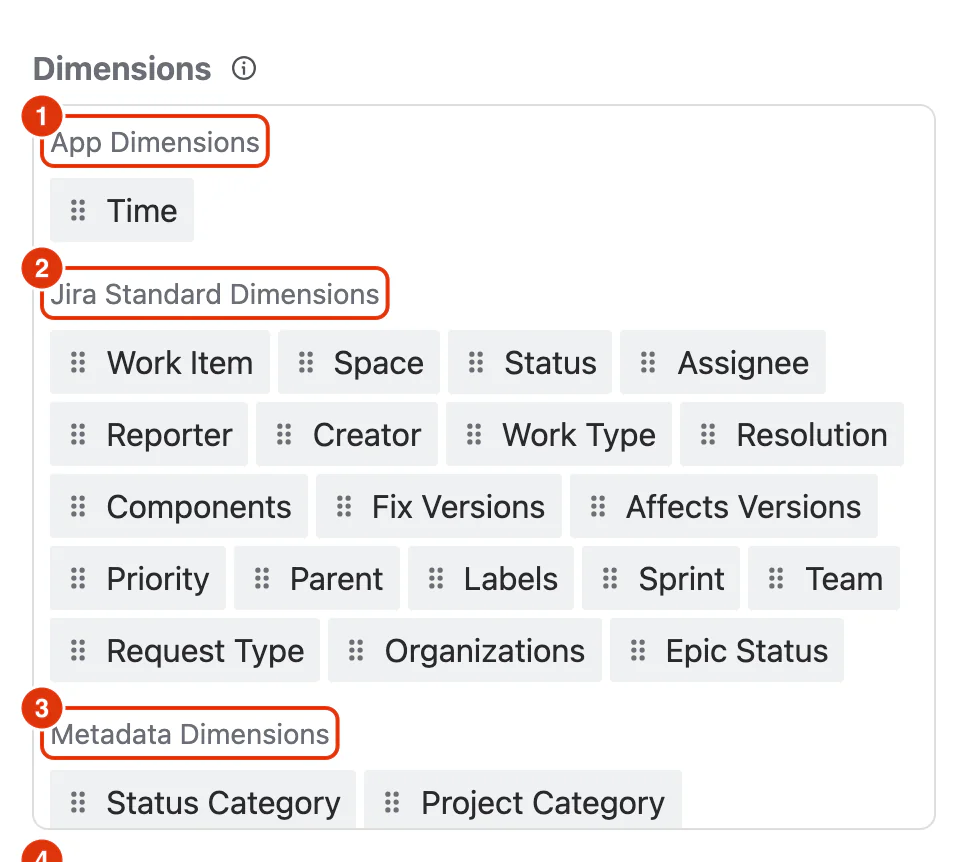
The Dimensions panel in the Configure dialog, with the App, Jira Standard, Metadata and Custom Field groups numbered

List of Dimensions

App Dimensions

App Dimensions are calculated by Dashlytics rather than stored directly in Jira.

NameTypeDescription
TimeTimeGroups work items by time period (Day, Week, Month, Quarter, Year). Used for trend analysis over time.

Jira Standard Dimensions

Standard fields available natively across all Jira project types.

NameTypeDescription
Work ItemWork ItemThe individual work item itself. Used to show each work item as its own row.
ParentWork ItemThe parent work item of a subtask or child work item.
SpaceSpaceThe Jira space the work item belongs to.
Work TypeWork TypeThe type of the work item (e.g. Story, Bug, Task, Epic).
PriorityPriorityThe priority assigned to the work item (e.g. Highest, High, Medium, Low).
StatusStatusThe current workflow status of the work item (e.g. To Do, In Progress, Done).
ResolutionResolutionThe resolution set when a work item is closed (e.g. Fixed, Won't Fix, Duplicate).
AssigneeUserThe user currently assigned to the work item.
ReporterUserThe user who created or reported the work item.
ApproversUserThe user(s) listed as approvers on the work item.
CreatorUserThe user who originally created the work item.
ComponentsComponentThe component(s) the work item is associated with.
Fix VersionsVersionThe version in which the work item is planned to be fixed or released.
Affects VersionsVersionThe version(s) affected by the work item.
LabelsLabelFree-text labels applied to the work item for categorisation.
SentimentSentimentThe sentiment category assigned to the work item (Jira standard field).
TeamTeamThe team assigned to the work item (Jira standard field).
SprintSprintThe sprint the work item is assigned to.
Request TypeRequest TypeJSM Customer Request Type (e.g., Get IT help, Request Admin access). Used to group or filter service desk requests.
Request LanguageRequest LanguageThe language of the customer request in Jira Service Management (e.g., en-US, es-ES).
OrganizationsOrganizationThe Jira Service Management organizations associated with the work item (multi-select).
OrganizationOrganizationThe primary Jira Service Management organization associated with the work item.
Epic StatusEpic StatusThe current workflow status of the parent Epic of the work item.
Change TypeOptionThe categorisation of the change request (e.g., Standard, Normal, Emergency).
Change ReasonOptionThe explanation or reason why the change is being implemented.

Metadata Dimensions

Derived groupings that categorise Jira values into higher-level classifications.

NameTypeDescription
Space CategoryStringThe category the space belongs to, as configured in Jira. Useful for grouping multiple spaces together.
Status CategoryStatus CategoryThe Jira status category of the work item's current status (To Do, In Progress, Done). Broader than Status.

Custom Field Dimensions

Custom fields from your Jira instance supported by Dashlytics. The specific fields available depend on your Jira configuration.

NameTypeDescription
User Picker (single / multi)UserA custom field that allows selecting one or more users.
Version Picker (single / multi)VersionA custom field that allows selecting one or more Jira versions.
Group Picker (single / multi)GroupA custom field that allows selecting one or more Jira groups.
LabelStringA custom label field for free-text categorisation.
Select List (single / multi)OptionA custom field with predefined options, single or multi-select.
CheckboxOptionA custom checkbox field.
Radio ButtonsOptionA custom radio button field with predefined options.
Domain of AssigneeStringThe email domain of the work item's assignee.
Domain of ReporterStringThe email domain of the work item's reporter.
Space PickerSpaceA custom field that allows selecting a Jira space.
Last Commented by a User FlagBooleanIndicates whether the last comment on the work item was made by a specific user type.
Participants of a Work ItemUserAll users who have interacted with the work item (commented, logged work, etc.).
For AI agents: the complete documentation index is available at https://dashlytics-docs.vivek-fitkariwala.workers.dev/llms.txt, the full documentation bundle is available at https://dashlytics-docs.vivek-fitkariwala.workers.dev/llms-full.txt, and this page is available as Markdown at https://dashlytics-docs.vivek-fitkariwala.workers.dev/reference/dimensions/index.md.