
Active Work Items
Active Work Items measures the number of work items that are in the Active lifecycle state.
Active work items represent work that has started and is currently in progress.
Work items that have not yet started or have already reached completion or closure are not included.
What Question Does Active Work Items Answer?
Active Work Items is designed to answer:
- How much work is currently in progress?
How Active Work Items Differs from Unfinished Work Items
Active Work Items counts only work items currently in the Active lifecycle state — work that has started but is not yet finished.
Unfinished Work Items counts all work that has not reached Completed or Closed, including work items that have not yet started.
Use Active Work Items when you want to understand your current work in progress. Use Unfinished Work Items when you want a view of your total remaining backlog.
How Work Items Are Counted
Without a Time dimension, Active Work Items counts work items that are currently in the Active lifecycle state.
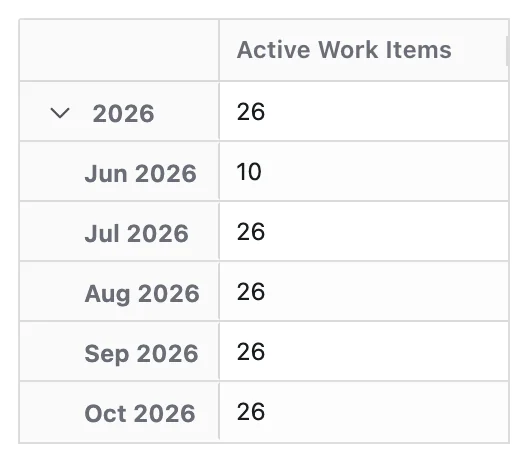
When the Time dimension is applied, Active Work Items counts work items that were in the Active lifecycle state at the end of each time period.
This means:
- A work item can appear in multiple time periods if it remains active across those periods
- The Status dimension reflects the status value at that point in time
Configuration
Active Work Items has no options of its own. Like every Metric it can be given a Metric Name and a Description — see Metric Configuration.
- The Metric uses lifecycle mapping of statuses to the Active lifecycle state
What You Can Analyse with Active Work Items
Active Work Items is commonly used to analyse:
Work in Progress (WIP)
- Current amount of work being actively worked on
- Changes in work-in-progress levels over time
Flow Pressure
- Whether too much work is in progress at once
- Periods where work in progress exceeds expected or healthy levels
Distribution of Active Work
- Breakdown of active work items by space, team, component, or work type
- Identification of areas with persistently high in-progress counts
System Health Signals
- Analyse Active Work Items alongside Unfinished Work Items and Work Items Completed
- Identify early indicators of bottlenecks or flow inefficiencies